The Hidden Profit Killers in Your Back Office
Ask any contractor what keeps them up at night, and you'll hear the same answers: finding good workers, winning bids, and managing cash flow. But there's a silent killer that doesn't make most lists—accounting errors.
Construction accounting is uniquely complex. Between retainage, progress billing, prevailing wage requirements, and job costing across multiple projects, there are countless opportunities for mistakes. And those mistakes add up fast.
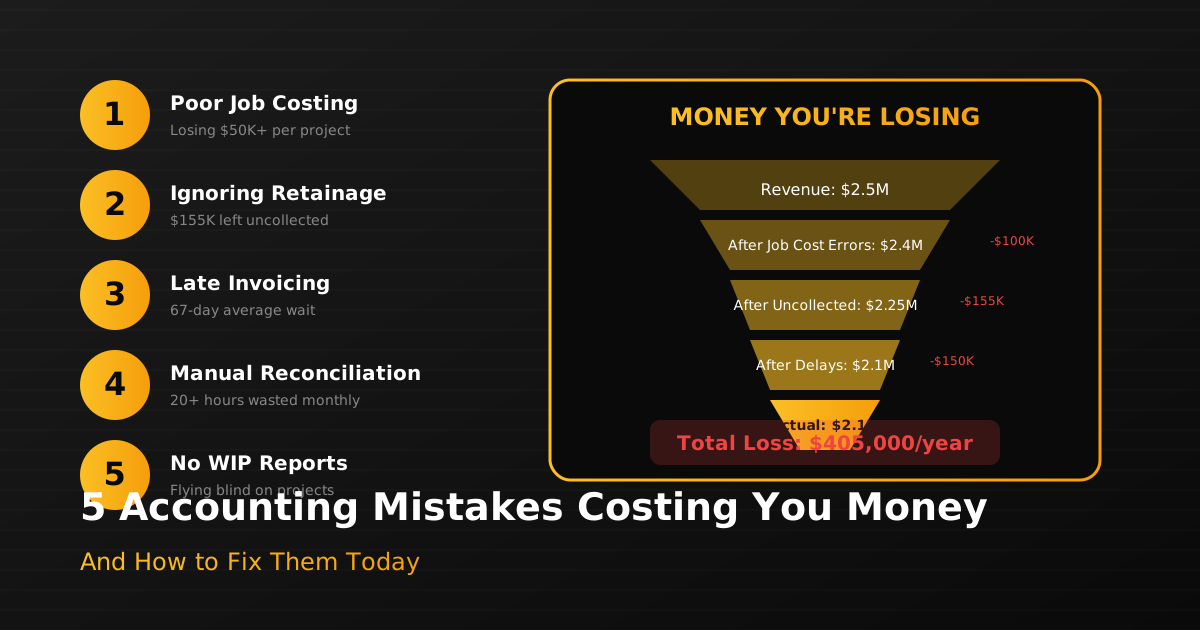
Here are the five most common construction accounting errors we see—and how to fix them.
Mistake #1: Inaccurate Job Costing
The Problem: Many contractors track costs at the company level but not at the project level. Or they track project costs but don't break them down by phase or cost code. The result? You have no idea which projects are actually profitable.
The Cost: Without accurate job costing, you're flying blind. You might be bidding new work based on losing projects, or you might be missing opportunities to improve margins on profitable ones.
The Fix: Implement real-time job costing that tracks every expense—labor, materials, equipment, subcontractors—by project, phase, and cost code. Modern AI accounting tools can categorize expenses automatically, so you always know exactly where you stand.
Mistake #2: Poor Retainage Management
The Problem: Retainage is money you've earned but can't collect yet—typically 5-10% of each progress payment. Many contractors track retainage in spreadsheets (or not at all) and forget to invoice for release when they're eligible.
The Cost: On a $1M project with 10% retainage, you could have $100,000 sitting uncollected. Multiply that across multiple projects, and you're looking at serious cash flow problems.
The Fix: Implement automated retainage tracking that: - Records retainage on every invoice automatically - Ages retainage balances by project and customer - Sends alerts when retainage is eligible for release - Generates release invoices with one click
Mistake #3: Manual Invoice Processing

The Problem: Every vendor invoice, subcontractor pay application, and material receipt has to be entered into your accounting system. Most contractors do this manually, spending hours each week on data entry.
The Cost: Manual entry is slow (averaging 10-15 minutes per invoice), error-prone (with error rates of 1-2%), and expensive (when you factor in the cost of fixing mistakes).
The Fix: Use AI-powered invoice processing that: - Scans and reads invoices automatically - Extracts key data (vendor, amount, date, job code) - Matches invoices to purchase orders - Routes for approval and posts to your system
This reduces processing time by 75% and virtually eliminates data entry errors.
Mistake #4: Ignoring Prevailing Wage Requirements
The Problem: Government projects require paying prevailing wages and submitting certified payroll reports. Many contractors either don't track this properly or spend hours manually calculating rates and generating reports.
The Cost: Non-compliance can result in penalties, back-pay requirements, and being barred from future government work. Manual compliance processes eat up valuable administrative time.
The Fix: Implement automated prevailing wage compliance that: - Looks up current rates automatically - Calculates pay based on job location and classification - Generates certified payroll reports - Flags potential compliance issues before they become problems
Mistake #5: Delayed Billing
The Problem: When you're busy running projects, billing often gets pushed to "when I have time." Progress billing applications are delayed, final invoices go out weeks after project completion, and cash collection suffers.
The Cost: Every day a bill is delayed is a day you're not getting paid. With typical payment terms of 30-45 days, a week of billing delays can mean waiting 6+ weeks for your money.
The Fix: Establish a regular billing rhythm and use automation to: - Generate progress billing based on percent complete - Pull in costs automatically from job costing - Format invoices correctly for each customer - Send reminders when payments are overdue

The Common Thread: Automation
Notice a pattern in these fixes? They all involve automation. The reality is that construction accounting is too complex for manual processes. The volume of transactions, the number of projects, and the specific requirements of the industry make errors inevitable.
AI-powered accounting tools designed specifically for construction can eliminate these errors while saving hours of administrative time each week. They're not replacing your accountant—they're making your accountant (or you, if you're wearing that hat) dramatically more effective.
Take Action Today
If you recognized your business in any of these mistakes, you're not alone. Most contractors struggle with at least one of these issues. The good news is that fixing them doesn't require a complete overhaul of your operations.
Start by identifying your biggest pain point. Is it job costing? Retainage tracking? Invoice processing? Focus on solving that one problem first, then move on to the next.
And if you want to see how AI can transform your construction accounting, book a demo with our team. We'll show you exactly how much time and money you could be saving.