The Time Trap Every Contractor Knows
If you're running a construction company, you know the feeling. You got into this business to build things, but you spend half your time on paperwork, emails, scheduling, and chasing payments. The actual construction work feels like a side job sometimes.
We talked to dozens of contractors who've implemented AI automation in their businesses. Their stories share a common theme: they're getting their time back—and their businesses are thriving because of it.
The Numbers Don't Lie
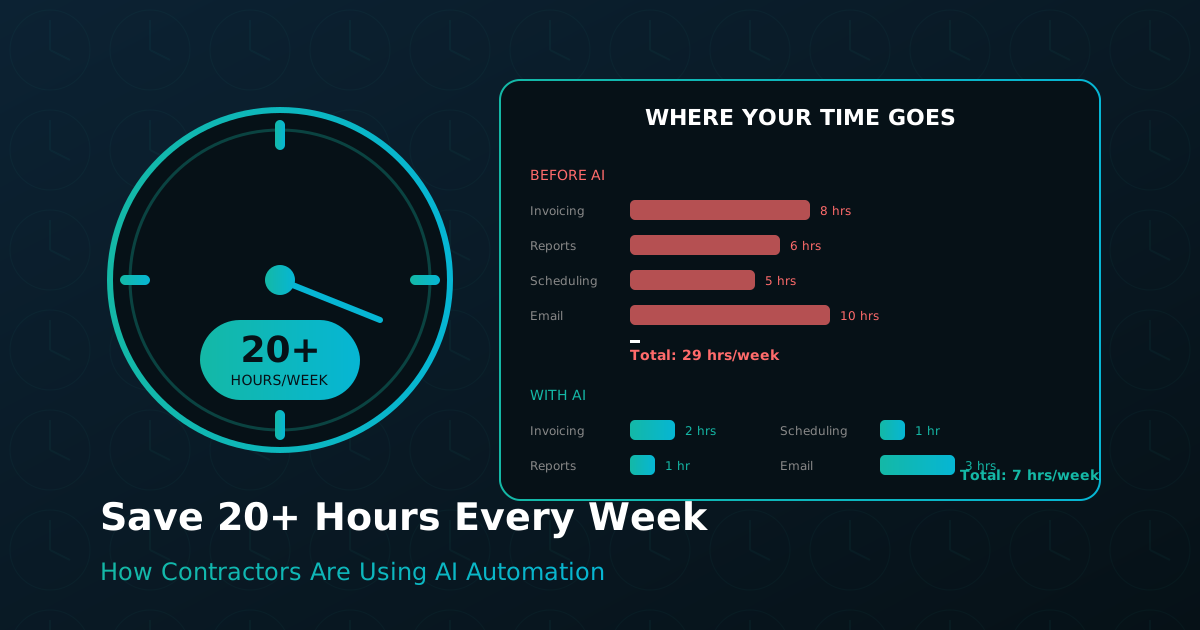
Before diving into specific stories, let's look at where contractors are finding time savings with AI:
| Task | Before AI | After AI | Time Saved |
|---|---|---|---|
| Invoice processing | 8 hrs/week | 2 hrs/week | 6 hours |
| Scheduling coordination | 5 hrs/week | 1 hr/week | 4 hours |
| Email management | 10 hrs/week | 3 hrs/week | 7 hours |
| Report generation | 4 hrs/week | 30 min/week | 3.5 hours |
| Lead follow-up | 3 hrs/week | 30 min/week | 2.5 hours |
That's over 23 hours per week—nearly three full workdays—that can be redirected to higher-value activities.
Case Study #1: Torres General Contracting

Company: 25-person general contractor, $12M annual revenue Challenge: Owner Mike Torres was spending 15+ hours per week on invoicing, job costing, and payroll
What They Automated: - Invoice processing and categorization - Job cost tracking and reporting - Progress billing generation - Retainage tracking
Results: - Invoicing time dropped from 8 hours to 2 hours per week - Cash collection improved by 12 days on average - Caught $47,000 in unbilled retainage in the first month - Mike now spends mornings on job sites instead of at a desk
"We went from 8 hours of invoicing per week to 2 hours. The retainage tracking alone has saved us thousands." — Mike Torres
Case Study #2: Pacific Builders Inc.
Company: 45-person commercial builder, $28M annual revenue Challenge: CFO Sarah Chen and her team were drowning in paperwork and couldn't keep up with job costing on 12 simultaneous projects
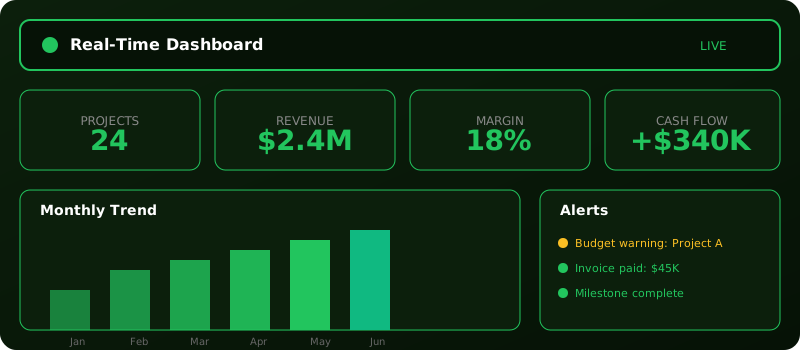
What They Automated: - Real-time job costing across all projects - Automated purchase order matching - Prevailing wage calculations and certified payroll - Financial reporting and dashboards
Results: - Job cost reports now available in real-time instead of monthly - Identified $180,000 in cost overruns early enough to take corrective action - Certified payroll generation dropped from 4 hours to 15 minutes - Accounting team now has capacity for strategic work
"Finally, software that speaks construction. No more spreadsheet workarounds for job costing." — Sarah Chen
Case Study #3: Wright & Sons Construction
Company: 60-person multi-trade contractor, $35M annual revenue Challenge: Operations Manager James Wright was constantly fighting fires—scheduling conflicts, material shortages, subcontractor no-shows
What They Automated: - Intelligent scheduling with conflict detection - Predictive material procurement - Subcontractor coordination and reminders - Equipment allocation and tracking
Results: - Scheduling conflicts reduced by 85% - Material stockouts virtually eliminated - Subcontractor on-time arrival improved from 72% to 94% - James went from reactive to proactive management
"The operations agent caught a scheduling conflict that would have cost us $50K. Paid for itself day one." — James Wright
What These Success Stories Have in Common
Looking across these cases (and dozens of others), several patterns emerge:
1. They Started with Their Biggest Pain Point
None of these companies tried to automate everything at once. Mike started with invoicing because it was eating his mornings. Sarah started with job costing because she needed better visibility. James started with scheduling because conflicts were killing his margins.
2. They Committed to the Change
Automation requires some upfront investment—not just money, but time to set up systems and change habits. The contractors who succeed are the ones who commit to the new way of working, even when the old way feels comfortable.
3. They Measured Results
These companies tracked their time and results before and after automation. That data helped them quantify the value they were getting and identify opportunities for further improvement.
4. They Reinvested Their Time
The goal isn't just to save time—it's to use that time for higher-value activities. Mike spends more time with customers and crews. Sarah does strategic analysis instead of data entry. James prevents problems instead of fixing them.
Getting Started: A Practical Roadmap
Ready to save 20+ hours per week in your own business? Here's a practical path forward:
Week 1: Audit Your Time Track how you spend your time for one week. Be honest—include all the emails, spreadsheets, and administrative tasks. Identify your biggest time sinks.
Week 2: Prioritize Pain Points Rank your time sinks by two factors: how much time they consume and how much value they add. The tasks that take lots of time but add little value are your automation targets.
Week 3: Evaluate Solutions Look for AI tools designed specifically for construction. Generic solutions often fall short because they don't understand retainage, job costing, or progress billing.
Week 4: Start Small Pick one pain point and implement a solution. Get it working smoothly before moving on to the next.
Ongoing: Expand and Optimize Once you've mastered one area, expand to the next. Keep measuring results and adjusting your approach.
The Bottom Line
Twenty hours per week is 1,000 hours per year. That's six months of full-time work. What could you accomplish with an extra six months?
The contractors who are thriving today aren't working harder—they're working smarter. They've recognized that AI automation isn't about replacing people; it's about freeing people to do what they do best.
If you're ready to reclaim your time, schedule a demo and see how Lava Focus AI can transform your construction business. We'll show you exactly where you're losing time and how to get it back.